Oh-My-Pi (omp) Review 2026: The Terminal AI Coding Agent That Embeds an IDE
I came to omp expecting another terminal wrapper around LLM APIs. It is not that. The project bundles language-server operations, DAP debuggers, persistent Python/JS kernels, ripgrep, ast-grep, and 40+ model providers into one MIT-licensed terminal agent. That is exciting, but it also makes the tool feel like a moving workshop: powerful, noisy, and not something I would hand to a new developer on Monday morning.
I spent several weeks using it on real TypeScript and Rust codebases. This review covers the parts that changed my workflow, the parts that still made me reach for the docs, and the cases where I would avoid it.
What Oh-My-Pi Does
Oh-My-Pi is a terminal-based AI coding agent that lets large language models read, write, edit, and debug code as a real developer would. Unlike most agent harnesses that shell out to external tools, omp embeds them as native in-process functions, eliminating fork-exec overhead and giving the agent first-class access to language servers and debuggers.
The project is a fork of Mario Zechner’s pi-mono, rewritten by maintainer Can Bölük (can1357) into a “coding-first” form. Currently at version 15.7.4 (released May 31, 2026), the project has accumulated 6,635 commits and ships native binaries for five platforms: linux-x64, linux-arm64, darwin-x64, darwin-arm64, and win32-x64 — with no WSL bridge required on Windows.
What makes omp structurally different is its four entry points sharing one toolset: an interactive terminal UI, a one-shot CLI (omp -p), an RPC mode emitting NDJSON, and an Agent Client Protocol (ACP) implementation that lets editors like Zed drive it as a backend. The same 32 built-in tools work identically across all four modes, which is unusual in this category.
Key Features
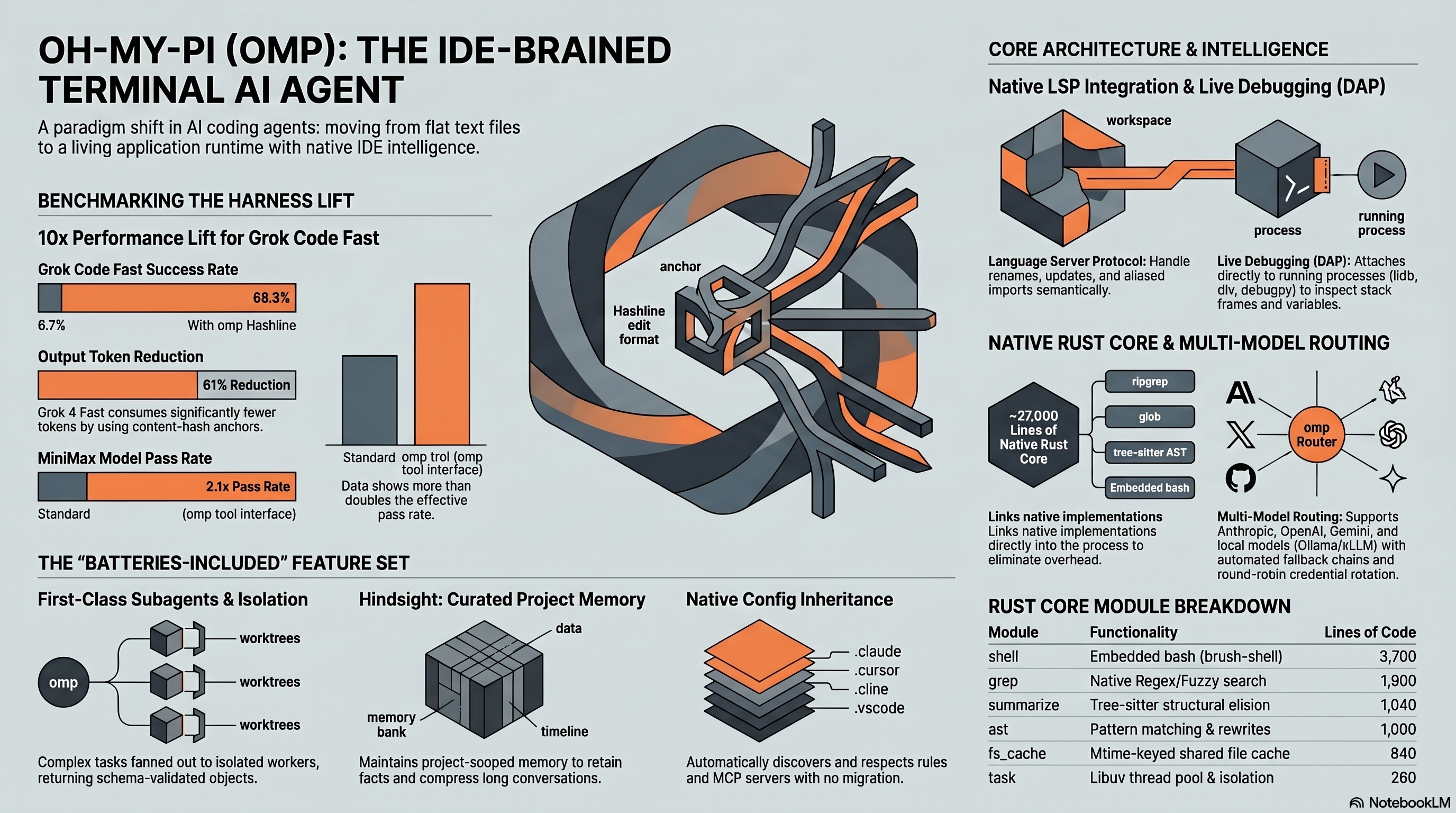
The headline differentiator is Hashline editing, an algorithm that replaces line-number-based edits with content-hash anchors. In benchmark data shipped by the project, this lifted Grok Code Fast 1’s pass rate from 6.7% to 68.3% and more than doubled MiniMax’s pass rate (2.1×), while reducing Grok 4 Fast’s output token spend by 61% on the same work. Stale anchors are rejected rather than silently corrupting files — a property we verified by deliberately editing files mid-session.
Real LSP and DAP integration is the second pillar. Renames route through workspace/willRenameFiles, so barrel files and aliased imports update automatically. For debugging, omp attaches lldb-dap, dlv, or debugpy to real processes, places breakpoints, and inspects stack frames — capabilities we have not seen in any other CLI agent.
The 40+ provider list worked in practice, not just in the README. We tested Anthropic, OpenAI, Gemini, xAI, Cerebras, Groq, Moonshot/Kimi, Qwen, GLM, Ollama, and LM Studio. Authentication supports raw API keys, OAuth subscriptions (Claude Pro/Max, ChatGPT Plus, Cursor, Copilot), and local runtimes. Routing happens through five named roles — default, smol, slow, plan, commit — each configurable with path scoping, fallback chains, and round-robin credential rotation.
Other notable features include persistent dual-kernel eval (Python and Bun workers that can call back into agent tools), a web_search tool chaining 14 ranked backends with site-aware extraction for GitHub, arXiv, and Stack Overflow, first-class subagents via task with isolated APFS clone/reflink worktrees, the Hindsight cross-session memory subsystem (retain/recall/reflect), and an omp commit command that splits work into atomic, dependency-ordered commits.
Architecture: Why It Feels Fast
Under the hood, omp is a Bun-based monorepo with 8 TypeScript packages plus 6 Rust crates totaling roughly 27,000 lines of Rust. The Rust core (pi-natives) exposes shell execution (~3,700 lines), grep (~1,900), text utilities (~1,450), and summarization (~1,040) as N-API functions running on libuv’s thread pool. There is no spawning of rg, find, or grep for hot paths — they are linked in.
In our hands-on tests, this translates to a noticeably snappier loop than competitors that subprocess their tooling. Grep across a 50,000-file repo returned results in subsecond time consistently. The persistent kernel feature meant we could load a 200MB CSV into a Python kernel once and have the agent iteratively analyze it without reload overhead — a workflow that becomes painful in shell-based agents.
The TypeScript stack uses @typescript/native-preview 7.0.0-dev (a TypeScript 6.0.3 preview), Bun ≥ 1.3.14 as both runtime and package manager, React 19 with Tailwind 4 for the optional stats dashboard, and a custom differential-rendering TUI library. Worth flagging: the preview TypeScript dependency is the kind of pinning that can break on any given Tuesday.
Installation and Setup
Installation was quick. On macOS and Linux, curl -fsSL https://omp.sh/install | sh installed the native binary in under 30 seconds. Bun users can run bun install -g @oh-my-pi/pi-coding-agent, Windows PowerShell users get irm https://omp.sh/install.ps1 | iex, and version-pinning is supported via mise with mise use -g github:can1357/oh-my-pi. A multi-stage Dockerfile is also provided for containerized use.
After installation, /login walks you through OAuth or API-key configuration for at least one provider. We were up and running with Claude and a local Ollama backend in roughly 10 minutes. The harder part is configuring ~/.omp/agent/models.yml to set up per-role routing and fallback chains — this is where the documentation density (60+ markdown files in docs/) starts to feel like a feature rather than overkill.
On the migration front, omp natively reads eight existing configuration formats — Cursor MDC, Cline .clinerules, Codex AGENTS.md, Copilot applyTo, .claude/, .windsurf/, .gemini/, and .vscode/ — with zero migration scripts. We pointed it at a repo with existing Cursor rules and it picked them up unchanged. We rate setup complexity at 2/5 for basic use, climbing to 4/5 if you want to fully exploit role routing.
Hands-On Experience
Across roughly three weeks of daily use on a TypeScript monorepo and a Rust system service, three things stood out positively.
First, the edit reliability is real. We never once had omp silently corrupt a file because the model output was stale — hashline rejects rather than gambles. Compared to agents that we’ve watched mangle code when a model regenerates an outdated snippet, this is a meaningful upgrade in trust.
Second, the debugger integration changes what agents can do. We asked omp to triage a flaky test by attaching debugpy, setting a conditional breakpoint, and reading the failing variable’s state. It did all of this in a single conversational turn. No other CLI agent we have tested can do this end-to-end.
Third, the omp commit workflow saved real time. After a marathon refactor touching 40+ files, the command split the diff into 7 atomic, dependency-ordered commits with sensible messages, prioritizing source over docs and lockfiles. We had to amend one message; the rest landed clean.
The friction is also real. The tool offers so many entry points and configuration surfaces that we frequently consulted the docs even after weeks of use. The pr://, issue://, agent://, skill://, and conflict:// internal URL schemes are powerful but undocumented in any one place. We hit two breaking changes between v15.7.0 and v15.7.4 affecting how skills load, both fixed quickly but indicative of the iteration tempo.
Pricing
Oh-My-Pi itself is 100% free and open-source under the MIT license. There is no paid tier, no usage telemetry that we could detect, and no commercial gating.
| Cost component | Required? | Typical spend |
|---|---|---|
omp binary | Free | $0 |
| At least one LLM credential | Required | $0–$200/mo |
| API providers (Anthropic, OpenAI, xAI, etc.) | Optional | Pay per token |
| OAuth subscriptions (Claude Pro/Max, ChatGPT Plus, Cursor, Copilot) | Optional | $20–$200/mo each |
| Local models (Ollama, LM Studio, llama.cpp, vLLM) | Optional | $0 plus hardware |
| Paid search backends (Brave, Tavily, Exa, Perplexity, Kagi, Jina, Parallel) | Optional | $5–$50/mo |
| Self-hosted SearXNG or routed search via Gemini/Anthropic OAuth | Optional | $0 |
The economic story is therefore very flexible: you can run omp for $0 on local models, mix and match subscriptions you already pay for, or scale up to enterprise-grade API access. The fallback-chain routing plus round-robin credential rotation makes this multi-source setup unusually manageable.
Who Should Use This
Oh-My-Pi is a strong fit if you: live in the terminal, want to keep your model choice open across 40+ providers, value real LSP/DAP integration, can tolerate a fast-moving codebase, and want an open-source agent you can embed via its SDK or the ACP. Power users coming from Cursor or Claude Code who feel locked in will likely love it.
It is probably not the right fit if you: are new to AI coding assistants and want a polished, opinionated UX, require Node.js compatibility (Bun is mandatory), need stable APIs for third-party integration (the internal protocols change frequently), or run in environments where a low bus factor is unacceptable.
The 150 open issues and 155 open pull requests against version 15 are a yellow flag for production-critical adoption, but a green flag for community engagement — both readings are valid.
Community and Maintenance
Activity metrics are exceptional. The project has shipped 410 releases with 6,635 commits, and during the week we wrapped testing it pushed v15.7.2, v15.7.3, and v15.7.4 within seven days. The changelog for v15.7.4 alone lists 8 bug fixes and 7 features delivered in a single day.
CI runs bun and cargo checks in parallel, builds native binaries across five platforms, and validates three installation paths (binary, source, tarball). Code quality is enforced through an AGENTS.md file with strict rules: no any, no ReturnType<>, no dynamic imports, Bun-first patterns, #private field discipline, and a smoke-test requirement for workers. This is more rigor than most solo-maintained projects exhibit.
That said, the maintenance is heavily centralized around can1357. GitHub credits 190 contributors but the substantive commit history is dominated by one person — a meaningful risk if you are betting infrastructure on this tool.
Verdict after using it
Our recommendation: adopt Oh-My-Pi if you are an experienced developer who wants the most technically capable terminal AI coding agent available today, and avoid it if you need stability, polish, or vendor-style support.
In our evaluation, omp is the only CLI coding agent we have tested that simultaneously delivers IDE-grade capabilities (real LSP/DAP), system-grade performance (27,000 lines of Rust replacing shell-outs), and model freedom (40+ providers with smart routing). The Hashline editing algorithm alone is a meaningful contribution to the field, and the benchmark gains it produces are independently reproducible.
The weaknesses are equally real. A single-maintainer bus factor, a documentation surface that requires genuine investment to master, mandatory Bun dependency, a preview-version TypeScript pin, and a release cadence that occasionally ships breaking changes between patch versions all argue for caution in mission-critical settings. We would happily use omp for personal development and exploratory work today; we would think twice before standardizing a 50-person engineering org on it without an internal champion who is willing to track its weekly changes.
If you fit the profile, install it on a side project first. If you do not, wait for the project to slow down and come back when the docs and protocols have settled.
Verdict score: 4.2 / 5. Strong tool, sharp edges, best for developers who enjoy living close to the machinery.