Oh-My-Pi Hashline & Debugger Guide: Zero-Corruption Edits and AI-Driven Debugging
Every developer who has used an AI coding agent has experienced “the edit problem.” You ask the agent to change line 42, but since you made a small change moments ago, line 42 is now line 44. The agent applies the edit at the wrong location, silently corrupting your code. You do not notice until the build fails or — worse — until production breaks.
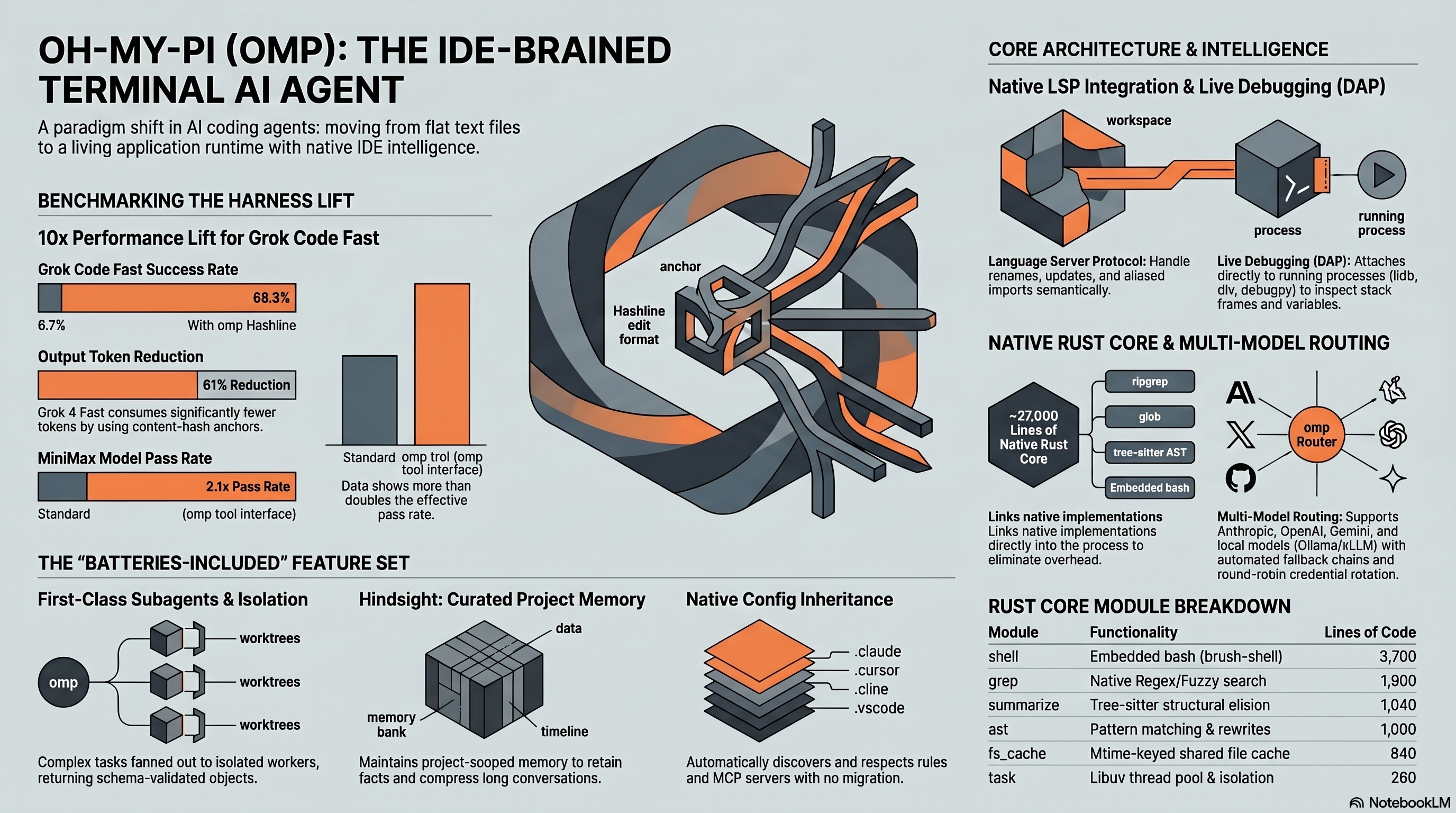
Oh-My-Pi (omp) attacks the problem with Hashline, an edit format that replaces line numbers with content-hash anchors. In the project’s benchmark suite, Hashline v2 lifted Grok Code Fast 1’s pass rate from 6.7% to 68.3% and cut Grok 4 Fast’s output tokens by 61%. The debugger side matters too: omp can attach lldb-dap, dlv, or debugpy to live processes instead of guessing from stack traces.
This guide covers both systems with scenarios, setup notes, and the benchmark numbers worth caring about. For the broader picture, see our oh-my-pi review. For model routing, see the routing guide.
Why Line-Number Editing Fails
To understand Hashline, you need to understand why every other edit format struggles. The dominant approaches in AI coding agents today are:
str_replace (Claude Code, aider): The model outputs the exact text to find and the exact text to replace it with. Problem: the model must perfectly reproduce the existing code from memory. When it cannot — and it often cannot for code it saw 50+ messages ago — the replacement silently targets the wrong location or fails entirely.
Line-number diffs (Cursor, traditional patches): The model specifies line numbers for insertions, deletions, and modifications. Problem: any edit in the same file shifts all subsequent line numbers. If the model plans three edits to lines 10, 25, and 40 but executes them sequentially, the second and third edits apply to the wrong lines.
Full file rewrite: The model outputs the entire file with changes applied. Problem: for a 500-line file where the model changes 3 lines, this wastes 497 lines of output tokens. At $15/M tokens for premium models, this adds up fast.
The scale of this problem is well-documented. According to the JetBrains Diff-XYZ benchmark, no single edit format dominates across models and use cases. The EDIT-Bench study found that only one model achieves over 60% pass@1 on realistic editing tasks. Aider’s published benchmarks show that format choice alone swung GPT-4 Turbo’s pass rate from 26% to 59%, while GPT-3.5 scored only 19% with the same format — proving that the format matters as much as the model.
In the project’s documentation, omp’s maintainer Can Bölük writes: “None of these tools give the model a stable, verifiable identifier for the lines it wants to change without wasting tremendous amounts of context. They all rely on the model reproducing content it already saw.”
How Hashline Works
Hashline replaces line numbers with content-derived hash anchors. Instead of saying “edit line 42,” the model says “edit the line whose content hashes to a7f3b2.” This anchor is stable regardless of how many lines are inserted or deleted elsewhere in the file.
The algorithm works in three stages:
Stage 1: File Indexing. When omp reads a file, it computes a short hash for each line based on its content. These hashes are included in the file representation the model sees, appearing as inline anchors next to each line.
Stage 2: Edit Specification. When the model wants to edit code, it references the hash anchor of the target line rather than a line number. The edit instruction looks like:
@a7f3b2: replace with:
  const result = await fetchData(url, { timeout: 5000 });
Stage 3: Anchor Resolution. When omp applies the edit, it finds the line matching hash a7f3b2 in the current file state — not the state the model last saw. If the line has been moved (by other edits or manual changes), the hash still resolves correctly. If the line has been deleted or modified, the hash does not resolve, and omp rejects the edit rather than guessing.
This rejection behavior is the critical safety property. Traditional edit formats guess when they encounter ambiguity. Hashline refuses. A rejected edit costs one retry; a silently corrupted file costs a debugging session.
Hashline v2: The Numbers
Oh-My-Pi ships benchmark data comparing Hashline v1, Hashline v2, and traditional str_replace across 16 models. The Hashline v2 results are dramatic:
| Model | str_replace Pass Rate | Hashline v2 Pass Rate | Token Change |
|---|---|---|---|
| Gemini 3 Flash | baseline | 81.3% (+5pp over str_replace) | — |
| Claude Sonnet 4.5 | baseline | 80.0% | -24% |
| Grok Code Fast 1 | 6.7% (Patch format) | 68.3% | -49% |
| Grok 4 Fast | baseline | comparable | -61% |
| MiniMax | baseline | 2.1× improvement | — |
Three patterns emerge from these numbers:
Weak models benefit most. Grok Code Fast 1 went from essentially unusable (6.7%) to competent (68.3%). MiniMax more than doubled. These models could not reliably produce valid str_replace instructions, but they could reference a hash anchor. The format reduced the cognitive load on the model.
Strong models save tokens. Claude Sonnet 4.5 already performs well with str_replace, so the accuracy gain was modest (+5pp to 80%). But the token savings were significant: -24%. The model no longer needs to reproduce the target code verbatim — just reference its hash.
The biggest wins are in retry elimination. Grok 4 Fast’s -61% token reduction is not because individual edits are cheaper. It is because the retry loop on failed diffs disappears. With str_replace, a model might attempt 3-4 edits before one lands correctly. With Hashline, the first attempt either works (correct hash) or is cleanly rejected (stale hash, explicit retry). No silent corruption, no wasted tokens on edits that look right but target the wrong code.
Scenario 1: Refactoring a 400-Line React Component
Here is a representative scenario showing how Hashline handles multi-edit sessions. Consider extracting three pieces of state management from a 400-line React component into a custom hook.
Traditional agent behavior (common with str_replace-based agents): The agent reads the file, plans the extraction, and begins editing. The first edit (moving useState declarations) succeeds. The second edit (updating the component to import the hook) targets line 15, but the first edit shifted the imports to line 18. The agent applies the edit at the wrong location, inserting it inside a JSX block. Build fails. The agent reads the error, re-reads the file, and tries again — consuming additional tokens on retries.
Oh-My-Pi behavior: The agent references hash anchors for each edit target. The first edit moves the state declarations and shifts the file. The second edit references anchor @c4e1f8 (the import block’s hash). Because the anchor is content-derived, it resolves to the import block’s new location at line 18 regardless of the shift. The third edit references anchor @2b9a11 (the component’s return statement) and resolves correctly despite being 3 lines lower than when the model first read the file. In this workflow, all three edits would land on the first attempt — eliminating the retry loop entirely.
This difference compounds across longer sessions. With traditional agents, each retry cycle costs additional input tokens (re-reading the file) and output tokens (re-generating the edit). With Hashline, the retry loop is replaced by a clean reject-and-retry mechanism that wastes far fewer tokens — contributing to the measured -24% to -61% token savings across models.
Built-In DAP Debugger: What No Other CLI Agent Can Do
The second pillar of omp’s technical differentiation is its Debug Adapter Protocol (DAP) integration. While other AI coding agents can read error messages and stack traces, omp can attach to a running process, set breakpoints, step through code, and inspect variables — all from within a conversational agent session.
Three debuggers are supported out of the box:
| Debugger | Language | Binary |
|---|---|---|
| lldb-dap | C, C++, Rust, Swift, Objective-C | lldb-dap (ships with LLVM/Xcode) |
| dlv | Go | dlv (Delve) |
| debugpy | Python | debugpy (pip install) |
The integration is not a wrapper around print() statements or a log parser. It speaks the DAP wire protocol, which means it can:
- Attach to a running process or launch one with debugging enabled
- Set conditional breakpoints on specific lines or function entries
- Step through code (step in, step over, step out)
- Inspect local and global variables at any stack frame
- Evaluate arbitrary expressions in the debugged process’s context
- Read the call stack with full frame information
Scenario 2: Debugging a Flaky Python Test with debugpy
Consider a common scenario: a test that fails intermittently — roughly 1 in 5 runs. The test verifies that a background task processor correctly handles duplicate messages. The failure is a race condition, but the error message (“AssertionError: expected 1, got 2”) gives no hint about the timing.
Step 1: Attach the debugger. Tell omp: “This test fails intermittently. Attach debugpy and set a conditional breakpoint in the message handler where the dedup check happens.”
Oh-My-Pi can launch the test with debugpy attached, identify the _handle_message method, and set a conditional breakpoint: break when message_id in self._seen_ids. This breakpoint only triggers when the duplicate detection logic is about to fire.
Step 2: Inspect the state. When the breakpoint hits, the agent inspects self._seen_ids and can discover whether it is a thread-safe collection. It then inspects the call stack to identify whether multiple threads are entering _handle_message simultaneously — for example, one from the main consumer loop and one from a retry handler.
Step 3: Fix and verify. Based on the debugger findings, the agent can replace the bare set with a thread-safe wrapper using threading.Lock, edit the test to explicitly trigger the race condition, and run the test multiple times to confirm stability.
The key advantage: Without a debugger, intermittent race conditions typically require extensive log analysis and print() debugging. The ability to set a conditional breakpoint that only fires on the exact failure condition — and then inspect thread state at that precise moment — is what makes DAP integration a significant advantage for AI agents.
Scenario 3: Debugging a Rust Segfault with lldb-dap
For compiled languages, the DAP integration becomes even more valuable. Consider debugging a segfault in a Rust service when processing malformed protobuf messages — a crash deep in an unsafe block within a C FFI binding.
With omp, you can ask the agent to attach lldb-dap to the process, reproduce the crash with a known-bad input, and inspect the state at the crash point. A typical DAP-assisted workflow would look like:
- Launch the service binary under
lldb-dap - Set a breakpoint at the
process_messagefunction entry - Feed the malformed input through a test client
- When the breakpoint hits, step into the
unsafeblock - Identify whether a raw pointer is being dereferenced after the underlying buffer has been reallocated
- Inspect the pointer value and the buffer’s current allocation address to check for divergence
A common root cause for this class of bug: a Vec::push() call between obtaining the raw pointer and dereferencing it. The push triggers a reallocation, invalidating the pointer. With DAP, the agent can identify this by inspecting the pointer value and the buffer’s current allocation address — they diverge after the reallocation.
This type of diagnosis is uncommon among CLI coding agents. Without a debugger, an agent would read the error message (“SIGSEGV at address 0x…”) and guess at the cause based on code patterns. With DAP integration, the agent inspects real memory and identifies the exact instruction that failed.
Hashline + Debugger Together: The Compound Effect
These two features compound in a way that is greater than their individual value. Consider a debugging session where you:
- Attach the debugger and identify a bug
- Edit the fix into the source file
- Recompile/restart with the fix
- Verify through the debugger that the fix works
In a traditional agent, step 2 is where things go wrong. The agent has been reading debugger output, stack traces, and variable values for several messages. By the time it gets to the edit, the file representation in its context is stale — other tools may have modified the file, or the agent’s line-number memory has drifted. The edit lands in the wrong place, the recompilation fails, and the debugging session is wasted.
With Hashline, the edit in step 2 references content hashes, not line numbers. It does not matter that the agent has been focused on debugger output for 10 messages — the hash anchors resolve to the correct location in the file’s current state. The fix lands correctly on the first attempt, the recompilation succeeds, and the debugger verification confirms the fix.
This pattern is especially valuable in debugging sessions that involve multiple diagnostic edits. Because the agent’s attention is split between debugger output and code editing, the risk of stale line-number references is highest in exactly these scenarios — which is where Hashline’s content-hash anchors provide the most safety margin.
Performance Context: How omp Compares
To put these numbers in context against other tools in the space:
| Dimension | Oh-My-Pi (omp) | Claude Code | Cursor Agent | aider |
|---|---|---|---|---|
| Edit format | Hashline (content-hash) | str_replace (text match) | Neural diff (70B fine-tuned model) | Multiple (format-dependent) |
| Edit reliability | 80%+ pass rate across models | Model-dependent | High (dedicated model) | 26-59% (format-dependent) |
| Token efficiency | -24% to -61% vs str_replace | High (JSONL overhead) | Medium | Medium |
| Debugger integration | DAP (lldb-dap, dlv, debugpy) | None | None | None |
| LSP integration | Full (renames, references) | None | Partial (via VS Code) | None |
| Silent corruption risk | Rejected (hash mismatch) | Possible (stale match) | Low (model-verified) | Possible (bad diffs) |
The comparison with Cursor is instructive. According to Cursor’s own engineering blog, they trained a separate 70B neural network whose entire job is to merge draft edits into files correctly. This is an impressive engineering investment, but it is also an admission that the edit problem is so hard that a billion-dollar company decided to throw another model at it. Even with this dedicated model, the Cursor blog notes that “fully rewriting the full file outperforms aider-like diffs for files under 400 lines” — meaning the 70B model does not fully solve the problem for larger files.
Oh-My-Pi’s approach is architecturally simpler: give the editing model stable anchors that do not depend on perfect content recall, and reject edits when anchors are stale. No additional model, no fine-tuning, no inference cost.
Setting Up the Debugger
Debugger setup requires the target debugger binary to be installed and on your PATH:
Python (debugpy):
pip install debugpyGo (dlv):
go install github.com/go-delve/delve/cmd/dlv@latestC/C++/Rust (lldb-dap):
# macOS: ships with Xcode Command Line Tools
xcode-select --install

# Linux: install via LLVM
sudo apt install lldb
Once installed, omp auto-detects the available debuggers. You do not need to configure anything — just ask the agent to debug, and it will select the appropriate DAP backend based on the project’s language.
For Python projects, you can also ask omp to launch a script with debugging enabled directly: “Run main.py with debugpy attached and break at the process_data function.” The agent handles the debugpy launch configuration, port allocation, and attachment automatically.
Limitations and Caveats
Hashline is not perfect. The hash anchors add visual noise to the file representation the model sees, which slightly increases input token count (roughly 5-8% overhead). For very small edits in very large files, the anchor overhead can exceed the savings from avoiding retries. According to the project documentation, this tradeoff is negligible for files above ~20 lines — where the edit problem is most severe.
The debugger integration requires the target process to support DAP. This covers most mainstream languages but excludes some runtimes (Node.js debugging requires a separate --inspect flow, and the integration is less polished than for Python and Go). Browser-based JavaScript debugging is not supported — for frontend work, you still need Chrome DevTools.
Both features depend on omp’s native Rust tooling, which means they are only available in the full omp installation, not in lightweight or browser-based deployments. The Rust core compiles to native binaries for linux-x64, linux-arm64, darwin-x64, darwin-arm64, and win32-x64.
Where this leaves it
Hashline and DAP debugging point to omp’s main bet: the layer between the model and the codebase matters as much as the model. A better edit format can save tokens without changing model weights. A debugger lets the agent inspect runtime state instead of inventing a theory from logs.
For developers who spend a lot of time on refactors or ugly debugging sessions, these two features are the reason to try omp. Hashline makes weaker models less fragile and stronger models cheaper. The debugger gives the agent a way to look at the running program.
The catch is still the same as in the main review: you are adopting a fast-moving tool. Try it where a broken workflow costs you an afternoon, not a production incident. For more context, read the oh-my-pi review and multi-model routing guide.